Make any 3D model print-ready in minutes
3D Prep Pro analyzes, repairs, and optimizes your 3D files automatically — watertight geometry, corrected wall thickness, and full-color textures preserved. Upload a broken mesh, download a model that prints.
100%
watertight output
Auto
wall thickness
DICOM
medical imaging
LiDAR
point-cloud scans
How it works
From broken file to ready-to-print, in four steps
No mesh-repair expertise required. Pick a preset, press repair, and let the pipeline do the rest.
Upload
Drag & drop OBJ, STL, 3MF, FBX, PLY, glTF, and VRM — plus DICOM medical scans, LAS/LAZ LiDAR point clouds, and ZIP archives.
Analyze
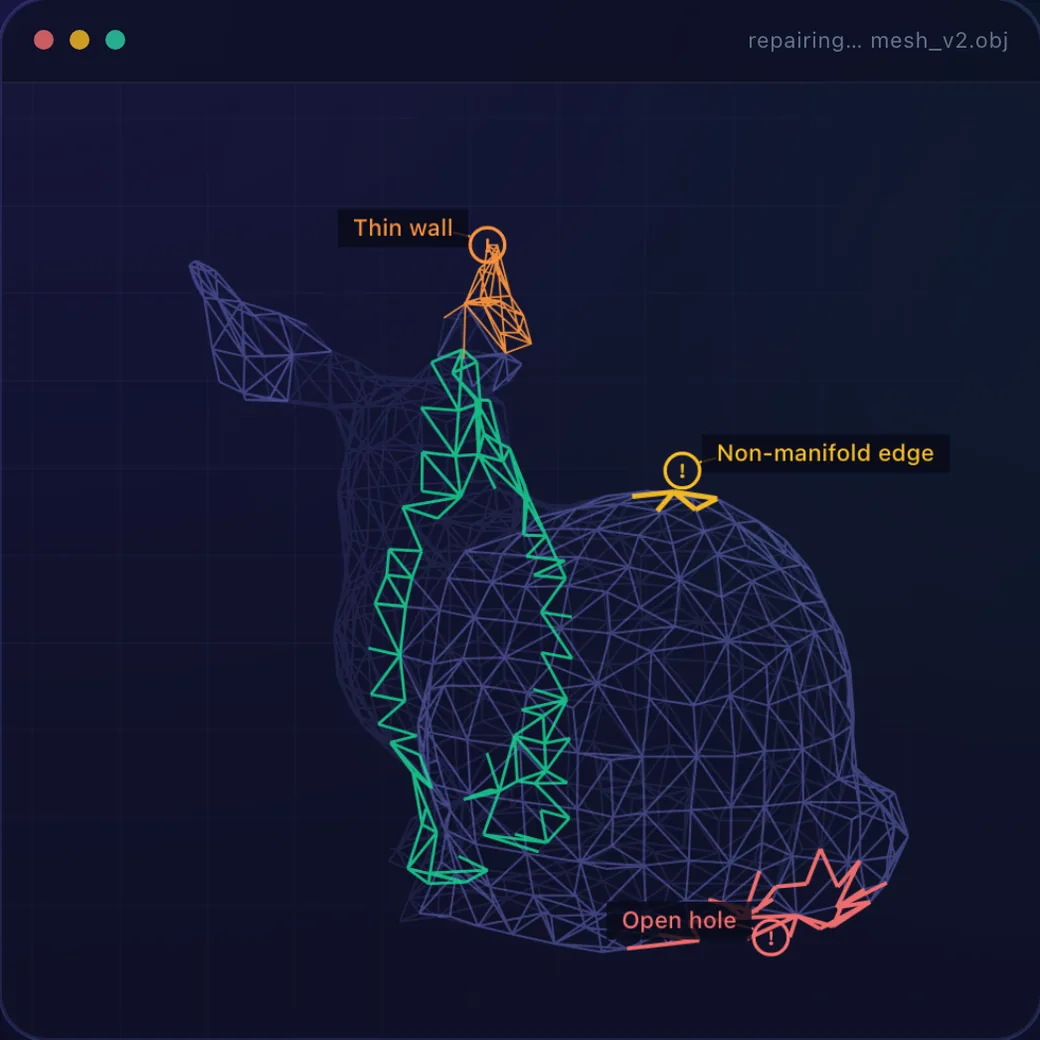
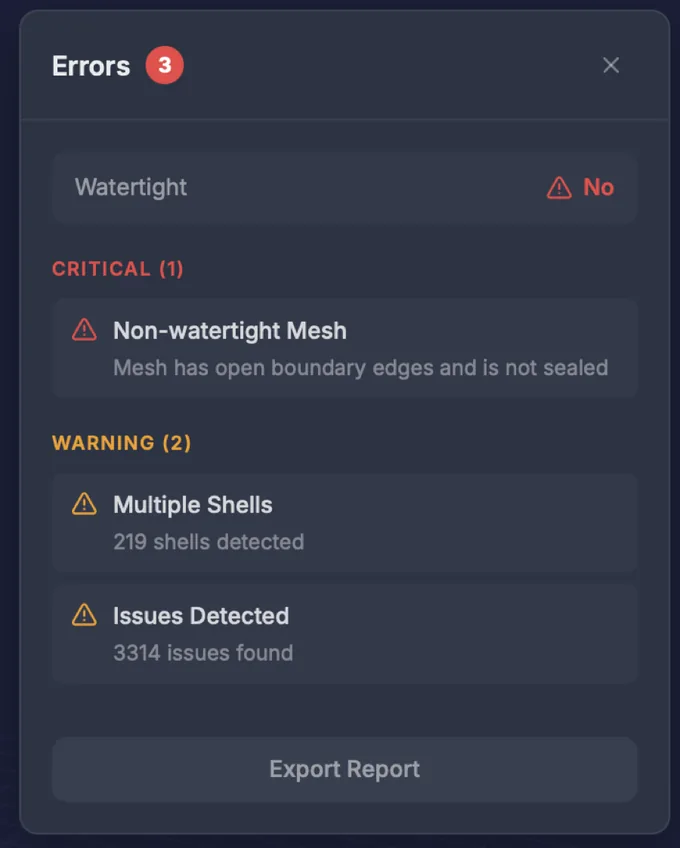
Automatic diagnostics with 360° previews: watertight checks, thin walls, loose parts, and thousands of issues surfaced in seconds.
Repair
Holes are closed, thin walls thickened, and loose parts merged into clean, solid geometry — all while your textures are preserved.
Export
Download print-ready OBJ, STL, GLB, or 3MF — plus a plain-English AI Fix Report of everything that changed.
Automated repair
From thousands of issues to printable. Automatically.
The same model, before and after one click of Repair — geometry rebuilt, colors intact, side by side in the built-in viewer.
Sealed & solid, every time
Repairs come out fully closed — no holes, no gaps — so your model slices and prints without surprises.
Thin walls, thickened
Fragile, too-thin areas are found and beefed up to a printable minimum, tuned to your model type.
Loose parts merged
Hundreds of floating, disconnected pieces fused into one clean, solid body ready to print.
Full color, preserved
Your colors and textures are carried onto the repaired model, so full-color prints come out exactly as designed.
As fast as you need
Choose a quick pass in seconds or a detailed repair for tricky models — the depth is up to you.
Originals never touched
Every repair is saved as a new version. Try different settings and re-repair whenever you like.
AI Fix Report
Know exactly what changed — in plain English
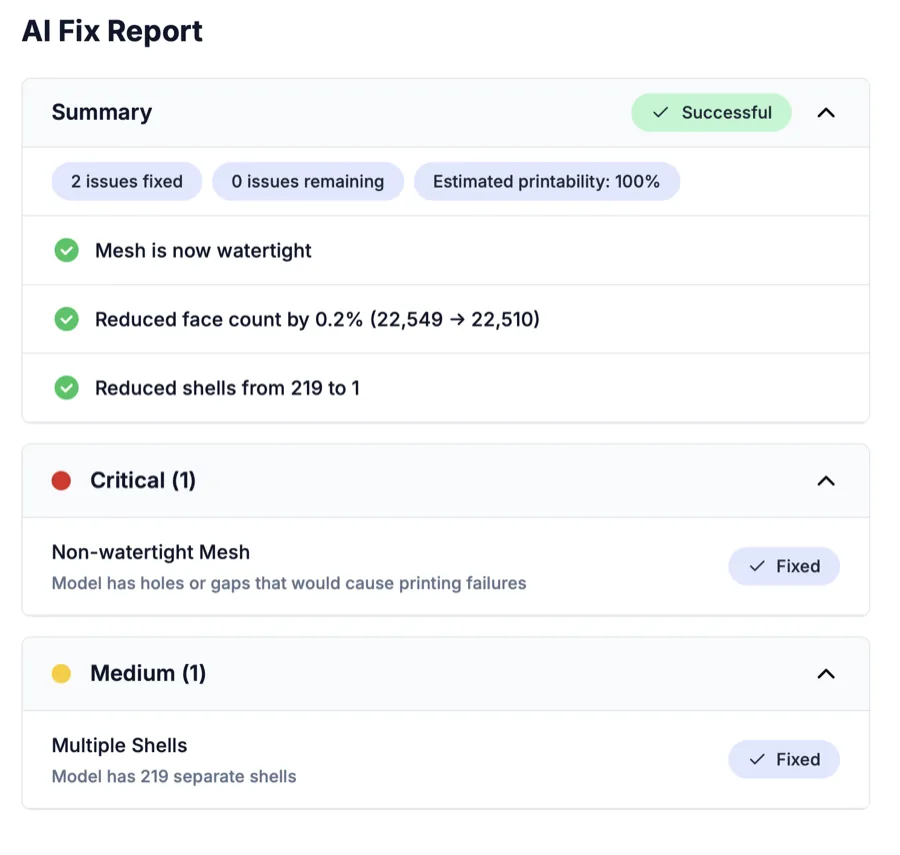
Every repair ends with a report anyone can read: issues found, grouped by severity, what was fixed, and an estimated printability score. No 3D printing expertise needed to understand your model's health.
- Critical, medium, and minor issues — triaged for you
- A printability score before you waste a print
- See exactly what changed, before and after
Precision tools
Not just repaired — production-ready
Beyond automatic fixing, 3D Prep Pro gives you the professional tools to make a model truly printable: reinforce it, resize it, lighten it, and make it yours.
Wall thickness
Find fragile walls before the printer does
3D Prep Pro scans your model for walls too thin to survive printing and automatically thickens them to a safe minimum — so nothing snaps, warps, or fails mid-print.
- Automatic thin-wall detection across the whole model
- Set a target thickness in millimeters, tuned per material
- Fragile areas reinforced without reshaping your model
Cutting & reassembly
Split oversized models into perfect-fit pieces
Slice any model along a plane to fit your build volume, then add interlocking keys so the pieces snap back together in exactly one way. Print big, assemble clean.
- Cut on any axis and keep both sides, capped and watertight
- Interlocking keys with adjustable clearance for a tight fit
- Great for statues, cosplay, and anything bigger than the bed
Lattice infill
Cut weight and material, keep the strength
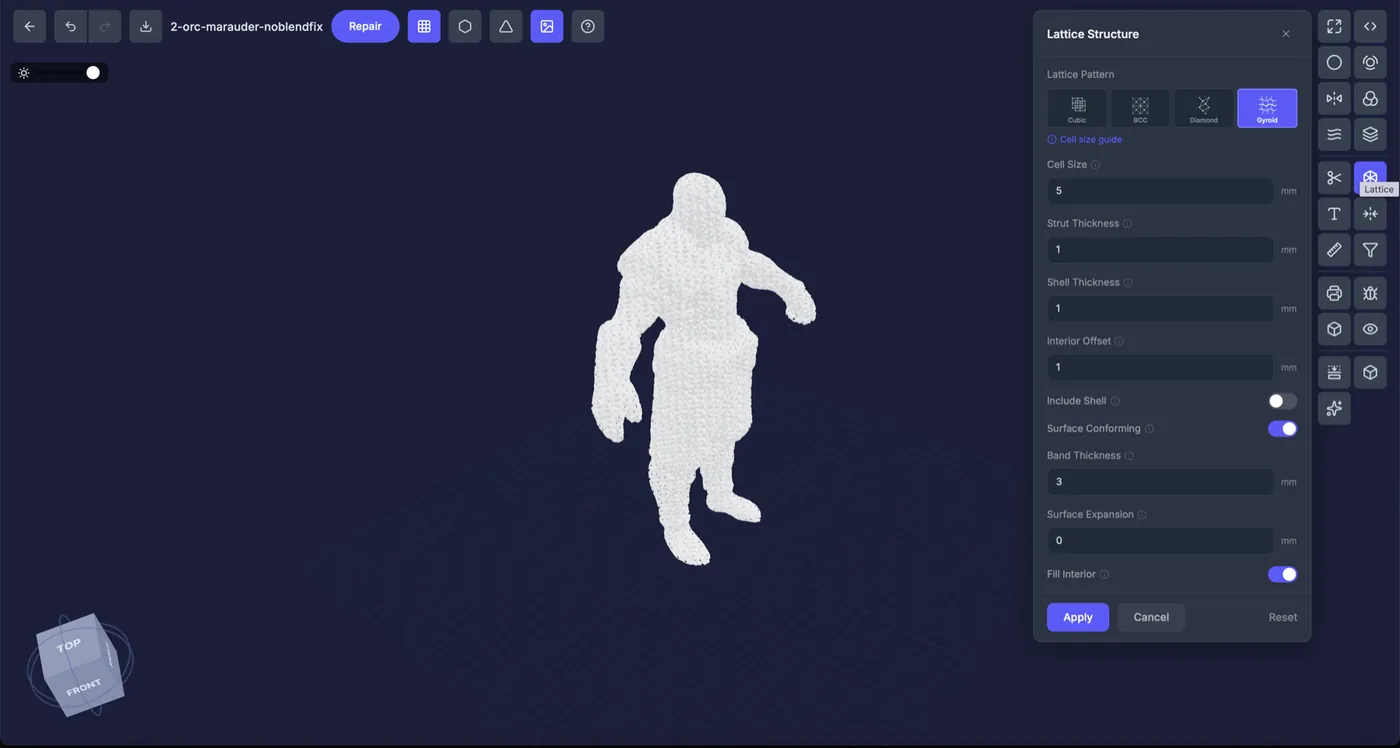
Replace solid interiors with engineered lattices — gyroid, diamond, and more — to slash material use and print time while keeping parts strong. Ideal for lightweighting and striking display pieces.
- Five patterns: Cubic, BCC, Octet, Diamond, and Gyroid
- Tune cell size, strut thickness, and shell independently
- Surface-conforming lattices that follow your model
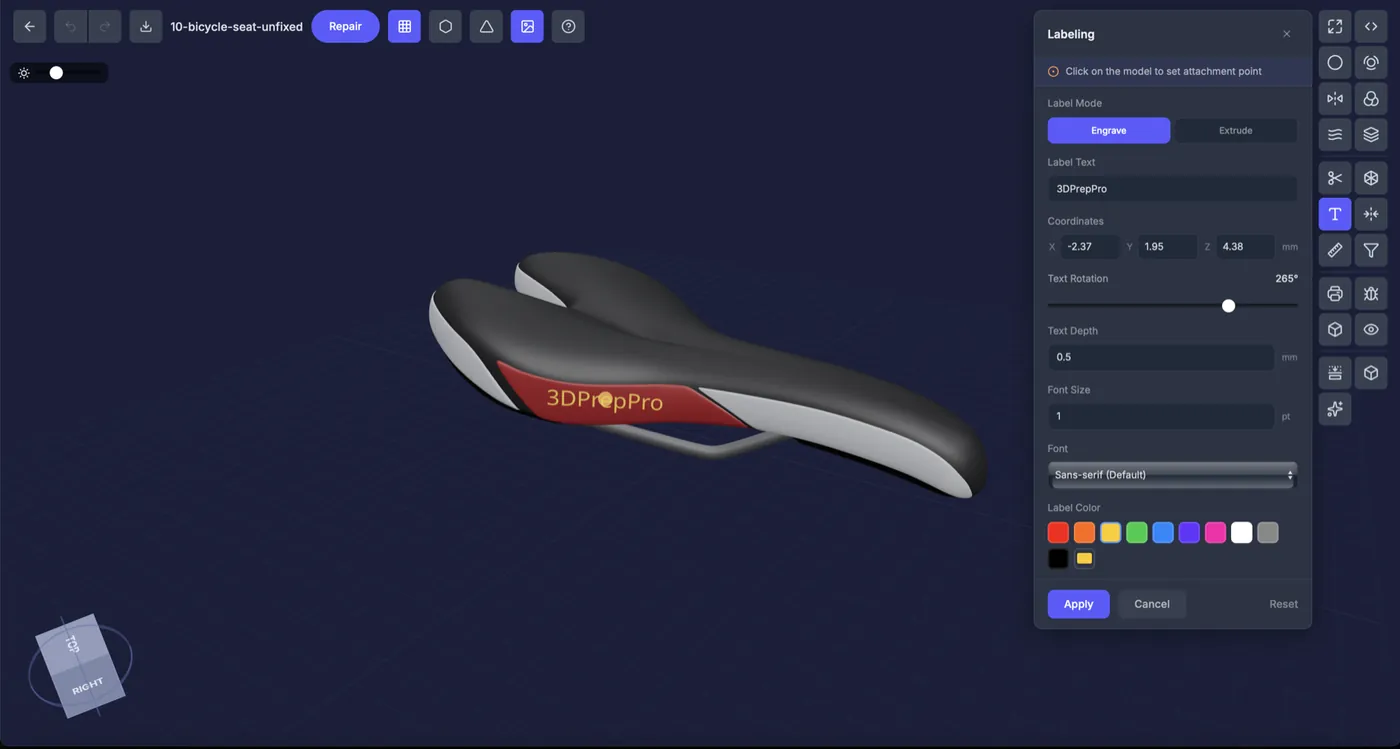
Labeling
Engrave serial numbers, logos, and text
Click anywhere on the surface and emboss or engrave text directly into the geometry — perfect for part numbers, branding, batch IDs, and personalization that prints as part of the model.
- Engrave into the surface or extrude raised lettering
- Control depth, rotation, font, size, and color
- Baked into the mesh, so it survives export and slicing
Beyond mesh files
From the real world, straight to print
3D Prep Pro doesn't stop at models. It turns raw scan data and medical imaging into clean, printable geometry — no separate conversion tools required.

LiDAR & point clouds
Scanned terrain, made solid
Import LAS and LAZ point clouds from LiDAR surveys and photogrammetry, and 3D Prep Pro reconstructs them into watertight, printable terrain and site models.
- Reads .las / .laz survey data directly
- Millions of points reconstructed into solid mesh
- Perfect for architecture, GIS, and landscapes

Medical imaging
CT & MRI scans into anatomical prints
Load DICOM series straight from CT and MRI machines, segment by tissue density, and export accurate, ready-to-print anatomical models.
- Imports .dcm DICOM CT & MRI series
- Tissue segmentation by Hounsfield density
- Bone, soft tissue, and more as separate parts
3D Editor
A complete 3D workshop — in your browser
Nineteen professional tools across pipeline, interactive, and inspection groups. Cut oversized prints with interlocking keys, drop in gyroid lattices, engrave labels, and validate every millimeter.
Pipeline tools
Re-run any repair stage with your own parameters.
- Scale
- Wall thickness
- Hollow
- Close holes
- Cut transparent
- Colors & textures
- Smooth
- Target faces
Interactive tools
Shape models directly in the viewport.
- Cut + interlocking keys
- Lattice infill · 5 patterns
- Label · emboss & engrave
- Mirror
- Measure
- Remove small parts
Inspection tools
Trust every layer before you print.
- Printability validation
- Error detection
- Object info
- 360° view
- Slice view
Built for real work
Powerful enough for anything you throw at it
From game characters to medical scans, 3D Prep Pro handles massive, messy models — fast, right in your browser.
Minutes
not hours
GPU-accelerated processing turns heavy models around fast — so you spend your time printing, not waiting.
8M
polygons per file
Bring your most detailed sculpts and scans. Huge, dense models are handled without breaking a sweat.
Any PC
no workstation needed
It all runs in your browser — nothing to install, and no exotic hardware or pricey graphics card required.
Pro-grade
quality output
The same professional engine built for production printing, refined across a wide range of real-world models.
File formats
If you can export it, we can prep it
Ten-plus import formats — meshes, medical imaging, and point clouds — up to 8 million polygons per file. Export print-ready OBJ, STL, GLB, or 3MF.
VRM & VTuber avatars
A dedicated pipeline handles anime-style characters, hair cards, and transparency — ready to print.
Archives, auto-extracted
Upload a ZIP, RAR, or 7Z and the best mesh inside is found and prepared for you automatically.
Built for your models
One tool, every kind of print
Model-type presets encode expert settings so the right walls, clearances, and textures are applied automatically.
Figurines & characters
Game rips, sculpts, and downloads with holes, thin fingers, and floating shells — repaired with colors intact.
Character preset · 0.7 mm walls
Mechanical parts
Functional prints with tight clearances and dimensional accuracy — texture off, precision on.
Mechanical preset · 1.5 mm clearance
Vehicles & props
Complex assemblies with hundreds of intersecting bodies fused into one printable model.
Vehicle preset · 0.8 mm walls
VRM & VTuber avatars
Anime characters with hair cards and transparency, prepared by a dedicated VRM pipeline.
VRM preset · smoothing on
Pricing
One simple plan. Everything included.
No tiers to compare, no per-repair fees. Unlimited model preparation for a flat monthly price.
3D Prep Pro
$60/month
Unlimited repairs and the full professional editor.
- Unlimited repairs
- Full 3D editor — every tool
- Fix report on every repair
- All formats — including DICOM, LiDAR & VRM
- Full-color textures preserved
- Priority processing
- Export OBJ, STL, GLB & 3MF
- Cancel anytime
Prices shown in USD. Own a Mimaki printer? Ask us about tailored pricing.
FAQ
Questions, answered
Most repair tools only fix geometry and run as desktop apps you install. 3D Prep Pro runs in your browser and combines automatic repair, a full 19-tool editor, and analysis in one place — and it preserves your full-color textures, so it's made for color 3D printing, not just single-color STLs.
Usually not. 3D Prep Pro replaces the typical toolchain — repair, editing, wall-thickness and clearance checks, even DICOM medical and LiDAR scan conversion — with one browser workspace, then exports print-ready OBJ, STL, GLB, or 3MF for any slicer.
Never. Every repair creates a new version alongside your original, and you can re-repair with different settings — or different presets — as many times as you like.
Most repairs finish in about 30 seconds to a few minutes, depending on your model's complexity and the quality level you pick — from Fast for a quick pass to Detailed for tricky models. Processing runs in the cloud, so your machine stays free.
Yes — that's the point. 3D Prep Pro carries your original colors, textures, and materials onto the repaired model at high resolution. It's built for full-color 3D printing.
OBJ, STL, 3MF, FBX, PLY, glTF/GLB, VRM, and WRL meshes, plus DICOM medical scans and LAS/LAZ LiDAR point clouds — up to 8 million polygons per file. ZIP, RAR, and 7Z archives are extracted automatically.
No. Model-type presets pick the right walls, clearance, and texture settings for you, and the AI Fix Report explains every change in plain English.
Yes. Export standard OBJ, STL, GLB, or 3MF that drops straight into any slicer or printer — and it's specially tuned for full-color machines like Mimaki and Stratasys.
Absolutely. It's a simple monthly subscription with no long-term contract — cancel whenever you like and keep access through the end of your billing period.
Stop fighting broken meshes.
Upload a model and watch it become print-ready — colors and all.